Patient Models
Goal
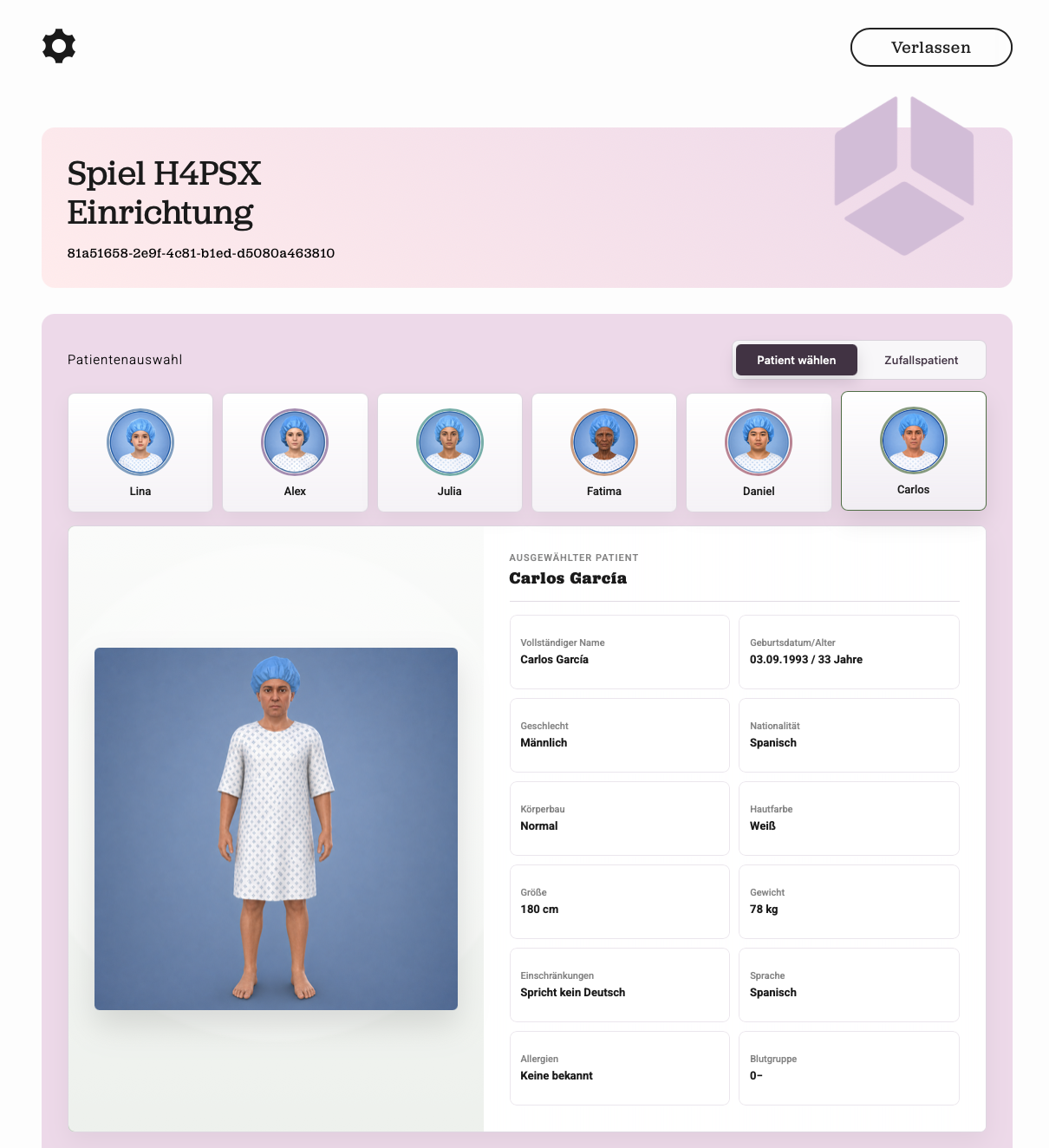
Room of Horror 2.0 extends the application with 6 diversified patient profiles. Depending on the selected profile, different errors are visible and selectable, the room is adapted (e.g. child bed, bed height), and the patient file contains individual data and file errors. No patient is “standard” — diversity is the fundamental principle of the application (see Value Proposition).
Initial situation
The inherited version (1.0) had no patient model logic: a single patient model without diversity characteristics, and errors managed solely via fixed numeric IDs. Patient-specific scenarios did not exist.
Implemented patient profiles
All 6 profiles are integrated in the database (patients table), in the frontend (selection with preview), and in the Unity scene.
| Patient | Name (fictional) | Description | Responsible | Status |
|---|---|---|---|---|
| A | Lina Weiss | Child (3) | Jan | Done |
| B | Alex Marin | Young adult, non-binary | Jan | Done |
| C | Julia Schneider | Middle-aged woman | Jan | Done |
| D | Fatima Diallo | Senior with dementia | Erik | Done |
| E | Daniel Kim | Obese patient with amputation | Jan | Done |
| F | Carlos García | Patient with social and language needs | Team | Done (scene, file, DB) |
Patient A – Child
| Characteristic | Value |
|---|---|
| Gender | Female |
| Age | 3 (child) |
| Build / height | Normal / 92 cm |
| Skin color | White |
| Disability | None |
Error scenarios:
- Call bell out of the child’s reach (ID 19)
- Child lies in an unsuitable adult bed (ID 20)
Patient B – Young adult
| Characteristic | Value |
|---|---|
| Gender | Non-binary |
| Age | 24 |
| Build / height | Normal / 181 cm |
| Skin color | White (DB) |
| Allergies | Penicillin allergy |
Error scenarios:
- Bed set too high (ID 21;
RoomConfiguratorscales the bed) - Alarm out of reach (ID 18)
- Wrong medication despite a documented allergy (ID 30, file error with choice dialog)
Patient C – Middle-aged woman
| Characteristic | Value |
|---|---|
| Gender | Female |
| Age | 44 |
| Build / height | Normal / 168 cm |
| Skin color | White |
Error scenarios:
- Too many visitors in the room (ID 22): a choice dialog requires asking all but one contact person to leave the room (
VisitorPopupTrigger).
Patient D – Senior with dementia
| Characteristic | Value |
|---|---|
| Gender | Female |
| Age | 80 |
| Build / height | Very slim / 156 cm |
| Skin color | Black |
| Condition | Dementia |
Error scenarios:
- Sensor mat (call mat) placed in the wrong position (ID 23)
- Doors blocked — access must remain clear at all times for safety reasons (IDs 24, 29, 31)
Patient E – Obese patient
| Characteristic | Value |
|---|---|
| Gender | Male |
| Age | 29 |
| Build / weight | Obese / 132 kg |
| Skin color | Asian |
| Disability | Right arm amputated |
| Specifics | Homelessness (missing address) |
Error scenarios:
- Regular bed instead of a suitable bariatric (heavy-duty) bed (ID 25;
RoomConfiguratorvisibly narrows the bed) - No address in the patient file (ID 26, file error). Missing address in the file (address popup with decision options).
Patient F – Patient with social and language needs
| Characteristic | Value |
|---|---|
| Gender | Male |
| Age | 33 |
| Nationality / language | Spanish / speaks no German |
| Specifics | Language barrier |
Error scenarios:
- Patient speaks no German (ID 27): a choice dialog in the patient file requires ensuring communication — the professionally correct solution is to involve an official interpreter (
PatientFileUI, translator popup).
Errors in the patient files
In addition to the room errors, every patient file can contain professional errors in the future — most importantly: diagnosis and medication do not match (ID 28). The file is implemented as an interactive clipboard in VR (PatientFileUI.cs, contents from PatientFileDefaultCatalog.cs): multi-page (master data, anamnesis, diagnosis, medication), browsable, with clickable error spots and multiple-choice decisions where only the professionally correct answer solves the error.
Technical implementation
Data model
Since the PostgreSQL migration, patient profiles live in the patients table (no longer only as constants in code). Key columns: patient_id, unity_model_id, master data (name, date of birth, age, gender, nationality, build, skin color, height, weight, disabilities, language, allergies, blood group), accent_color for the frontend, allowed_error_ids (JSONB), and default_error_amount. The 6 profiles are seeded via upsert at API startup. Details: Data Model.
Frontend
Patient selection before game start (PatientSelection.tsx):
- targeted selection or random mode — each with a preview (avatar, name, key data, accent color)
- based on the profile, only the associated errors are shown (
Data.ts) - profiles come from
GET /patient/get-patients
Backend
- The game stores
game_patient_idandgame_patient_model;PUT /game/edit-game?target=patientIdsets both consistently. - The error selection is validated against the selected patient’s
allowed_error_ids(EditGame.ts). - Patient and model changes are blocked while a game is running.
Unity
- Six patient roots in the scene are activated/deactivated per game (
GameStatusController.ApplyPatientModel); additionallyPatientSpawnerexists for prefab-based spawning (Assets/Models/Patients_Modells/Patient_A–E.prefab). RoomConfiguratoradapts the room to the profile (bed height for B, bed width for E, reset to defaults on every change).- Errors are firmly coupled to their patient; Unity only activates the IDs delivered by the backend.
- Models were created in Blender and imported as FBX with materials (one feature branch per patient, e.g.
feature/patient-c).
Design decision: central error catalog
Error data (name, category, weight, criticality, feedback hints) lives centrally in evaluation/ErrorCatalog.ts and is mirrored into the error_definitions DB table. Frontend icons and Unity object names are still maintained separately — see Error Catalog and Design Decisions.
Ideas for future project teams
These extensions were deliberately not implemented (time frame / scope):
- Consideration of religious needs and prayer times
- Scenarios in which patients leave the room and must be guided back
- Raising awareness of different communication styles (pain scales, targeted follow-up questions)
- AI-supported patient conversations (LLM-based)
- Multilingual patient interactions
Information sources
room-of-horror-api/database/General.ts(seed data of all 6 profiles, error mapping)room-of-horror-unity/Assets/Scripts/GameStatusController.cs,PatientSpawner.cs,RoomConfiguration/*,PatientFileUI.cs,PatientFileDefaultCatalog.cs,SampleScene.unityroom-of-horror-frontend/src/components/PatientSelection.tsx,src/utils/Data.ts- Weekly reports (requirements and feedback from Lily Dausch)
Last build: 19 Aug 2026, 05:20+00:00